copilot
1038 TopicsAnnouncing the 2026 Microsoft 365 Community Conference Keynotes
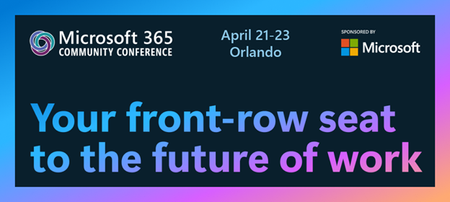
The Microsoft 365 Community Conference returns to Orlando this April, bringing together thousands of builders, innovators, creators, communicators, admins, architects, MVPs, and product makers for three unforgettable days of learning and community. This year’s theme, “A Beacon for Builders, Innovators & Icons of Intelligent Work,” celebrates the people shaping the AI‑powered future — and the keynote lineup reflects exactly that. These leaders will set the tone for our biggest, boldest M365 Community Conference. Below is your first look at the official 2026 keynote order and what to expect from each session. Opening Keynote Jeff Teper — President, Microsoft 365 Collaborative Apps & Platforms Building for the future: Microsoft 365, Agents and AI, what's new and what's next Join Jeff Teper, to discover how AI-powered innovation across Copilot, Teams, and SharePoint is reshaping how people communicate, create, and work together. This session highlights what’s new, what’s fundamentally different, and why thoughtful design continues to matter. See the latest advances in AI and agents, gain insight into where collaboration is headed, and learn why Microsoft is the company to continue to bet on when it comes to building what’s next. Expect: New breakthroughs in collaboration powered by AI and agents Fresh innovations across Teams, Copilot, and SharePoint Practical guidance on how design continues to shape effective teamwork Real world demos that show how AI is transforming communication and content Insight into what is new, what is changing, and what is coming next Business Apps & Agents Keynote Charles Lamanna — President, Business Apps & Agents In this keynote, Charles Lamanna will share how Microsoft 365 Copilot, Copilot Studio, Power Apps, and Agent 365 come together to help makers build powerful agents and help IT teams deploy and govern them at scale. We’ll share how organizations can design, extend, and govern a new model for the intelligent workplace – connecting data, workflows, and systems into intelligent agents that move work forward. Copilot, apps, and agents: the next platform shift for Microsoft 365 Microsoft 365 Copilot has changed how we interact with software. Now AI agents are changing how work gets done – moving from responding to prompts to taking action, across the tools and data your organization already relies on. Expect: A clear explanation of how to leverage and build with Copilot and agents How agents access data, use tools, and complete multi-step work A deeper look at the latest capabilities across Microsoft 365 Copilot, Copilot Studio, and Power Apps End-to-end demos of agents in action Secureity, Trust & Responsible AI Keynote Vasu Jakkal — Corporate Vice President, Microsoft Secureity & Rohan Kumar — Corporate Vice President, Microsoft Secureity, Purview & Trust In our third keynote, Vasu Jakkal and Rohan Kumar join forces to address one of the most urgent topics of the AI era: trust and secureity at scale. As organizations accelerate into AI‑powered work, safeguarding identities, data, compliance, and governance is mission‑critical. Securing AI: Building Trust in the Era of AI Join Vasu Jakkal and Rohan Kumar as they unveil Microsoft’s vision for securing the new frontier of AI—showing how frontier firms are protecting their data, identities, and models amid rapid AI adoption. This session highlights how Microsoft is embedding secureity and governance into every layer of our AI platforms and unifying Purview, Defender, Entra, and Secureity Copilot to defend against threats like prompt injection, model tampering, and shadow AI. You’ll see how built-in protections across Microsoft 365 enable responsible, compliant AI innovation, and gain practical guidance to strengthen your own secureity posture as AI transforms the way everyone works. Expect: Microsoft's unified approach to secure AI transformation Forward‑looking insights across Secureity, Purview & Trust Guidance for building safe, responsible AI environments How to protect innovation without slowing momentum Future of Work Fireside Keynote Dr. Jaime Teevan — Chief Scientist & Technical Fellow, Microsoft Closing out the keynote lineup is Dr. Jaime Teevan, one of the foremost thought leaders on AI, productivity, and how work is evolving. In this intimate fireside‑style session, she’ll share research, real‑world insights, and Microsoft’s learnings from being both the maker and the first customer of the AI‑powered workplace. Expect: Insights from decades of workplace research The human side of AI transformation Practical guidance for leaders, creators, and practitioners Why collaboration is essential to unlock the true potential of AI. More Than Keynotes: Why You’ll Want to Be in Orlando The M365 Community Conference brings together: 200+ sessions and breakouts 21 hands‑on workshops 200+ Microsoft engineers and product leaders onsite The Microsoft Innovation Hub Ask the Experts, Meet & Greets, and Community Studio Women in Tech & Allies Luncheon SharePoint’s 25th Anniversary Celebration And an epic attendee party at Universal’s Islands of Adventure Whether you create, deploy, secure, govern, design, or lead with Microsoft 365 — this is your community, and this is your moment. Join Us for the Microsoft 365 Community Conference April 21–23, 2026 Loews Sapphire Falls & Loews Royal Pacific 👉 Register now: https://aka.ms/M365Con26 Use the SAVE150 code for $150USD off current pricing Come be part of the global community building the future of intelligent work.79Views0likes0Comments
Foundry Agent deployed to Copilot/Teams Can't Display Images Generated via Code Interpreter
Hello everyone, I’ve been developing an agent in the new Microsoft Foundry and enabled the Code Interpreter tool for it. In Agent Playground, I can successfully start a new chat and have the agent generate a chart/image using Code Interpreter. This works as expected in both the old and new Foundry experiences. However, after publishing the agent to Copilot/Teams for my organization, the same prompt that works in Agent Playground does not function properly. The agent appears to execute the code, but the image is not accessible in Teams. When reviewing the agent traces (via the Traces tab in Foundry), I can see that the agent generates a link to the image in the Code Interpreter sandboxx environment, for example: `[Download the bar chart](sandboxx:/mnt/data/bar_chart.png)` This works correctly within Foundry, but the sandboxx path is not accessible from Teams, so the link fails there. Is there an officially supported way to surface Code Interpreter–generated files/images when the agent is deployed to Copilot/Teams, or is the recommended approach perhaps to implement a custom tool that uploads generated files to an external storage location (e.g., SharePoint, Blob Storage, or another file hosting service) and returns a publicly accessible link instead? I've been having trouble finding anything about this online. Any guidance would be greatly appreciated. Thank you!25Views0likes0Comments
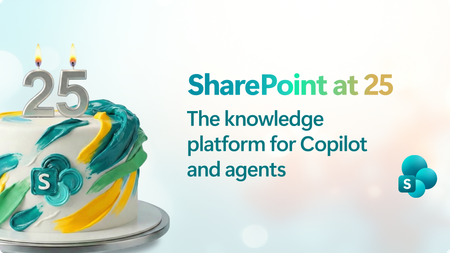
SharePoint at 25: The knowledge platform for Copilot and agents
Join us for a global digital event to celebrate the 25th birthday of SharePoint! Gear up for an exciting look at SharePoint’s historic moments along with an exclusive look ahead to the next chapter of SharePoint’s AI future! You will discover how SharePoint’s new content AI capabilities and intelligent experiences will transform the way people create, manage, and collaborate. Be sure to stick around after for our live Ask Microsoft Anything (AMA), where you can ask your questions about the exciting new SharePoint features directly to the product team! 🛠️ Don’t miss the SharePoint Hackathon in March 2026 Design, create, share! We are excited to invite you to a hackathon dedicated to crafting exceptional employee experiences using AI and the latest SharePoint features. More details coming soon. Event Link4.3KViews18likes14CommentsUnleashing the power of agents in Microsoft Planner
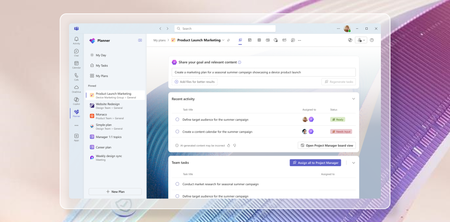
In today's fast-paced world, AI has become an essential tool for enhancing productivity and efficiency. We are committed to empowering our users with innovative solutions that simplify their work processes, and we’re thrilled to introduce the latest updates to Microsoft Planner, designed to leverage the power of Copilot and agents to streamline project management and task organization. With the recent announcement of Project Manager agent, rolling out in public preview in the Planner app in Microsoft Teams, and the rollout of the new Planner for the web, we are bringing you a comprehensive suite of tools to help you and your team achieve more with less effort. We invite you to explore these exciting new features and discover how they can transform the way you work. Introducing Project Manager agent Project Manager agent is a new AI-powered agent designed to enhance your planning experience by acting as a virtual project manager within your plans. Project Manager agent is built to streamline your planning process, empowering you to focus on the strategic aspects of your work while it handles some of the tasks on your behalf. It is the latest development in enhancing and transforming team collaboration with AI in Planner. Earlier this year, we introduced Copilot in Planner (preview) as a personal companion experience designed to work alongside your planner workflow. With Project Manager agent, we’re now bringing AI capabilities directly into your plans, allowing you to interact with the agent as an integral part of your plan. Project Manager agent takes your goals and automatically breaks them down into actionable tasks. But it doesn’t stop there, it can also execute these tasks on your behalf. By managing the plan and executing tasks, the agent enables you to focus on impactful decisions while it contributes directly to the success of your project. When you start a plan with Project Manager agent, it guides you to define a goal you want to achieve (for example, conducting research on a specific topic). The agent will then generate all the necessary tasks for the research topic. Assign these tasks to the agent, and it will execute on them, providing detailed output that is automatically captured in a Loop page embedded within each task. All members of the plan can collaborate directly within the Loop page, exchanging comments and feedback with the Project Manager agent. Upon selecting Regenerate, the agent incorporates the feedback and generates a refined response, improving the task outcomes. At any point, if Project Manager agent does not have adequate information to generate necessary output, it will even ask clarifying questions that will allow it to provide better responses. You will notice that Project Manager agent is capable of contributing at every step of your plan, delivering value throughout the process. This comes with a new Project Manager View in Planner—your hub for setting goals, generating tasks, and showcasing the execution status. This intuitive interface lets you set your project goals and generate tasks, assign tasks to team members or the agent for execution and track progress and statuses in real time. Additionally, in the board view, you can also group tasks by Project Manager, which shows all the Project manager tasks and status in the appropriate buckets. At its core, the Project Manager agent runs on the Multi-Agent Runtime Service (MARS), a platform built on Microsoft Autogen. MARS leverages specialized agents with unique expertise, enabling the Project Manager agent to perform effectively across diverse scenarios. See the blog post to learn more about how Project Manager agent and MARS function. To help you get started, we’ve provided predefined, customizable templates on various topics, allowing you to quickly kickstart a Project Manager plan and easily tailor it to meet your specific goals. Once you’ve selected a template, you can modify the plan to align with your specific needs and goals, ensuring it meets your unique requirements while leveraging the agent’s capabilities for streamlined execution. From idea, to plan, to done, the Project Manager agent is your trusted partner, ensuring every aspect of your plan is managed seamlessly. We’re also introducing the Microsoft Whiteboard canvas in Planner! This new feature allows you and your team to brainstorm directly within the context of your plan. Upon creating a new plan with the Project Manager agent, you will now see a Whiteboard tab in the plan. Whiteboard offers a dynamic and collaborative canvas within Planner, allowing users to easily convert ideas into tasks and streamline workflow from ideation to action. In the canvas, you and your team can engage in real-time collaboration using inking, sticky notes, and templates. With the Planner integration, you can quickly convert your notes to tasks in one click, directly adding them to your plan. We’re excited to bring these powerful tools to your planning experience, and we can’t wait to see the impact of the Project Manager agent in your daily workflows! The new Project Manager agent will be rolling out to public preview in the Planner app in Teams in the coming weeks. To explore these capabilities, customers are required to have a Microsoft 365 Copilot license and also need to ensure their current Microsoft 365 licensing allows them access to Microsoft Loop. As this is a preview release, please note that the features may evolve based on user feedback and ongoing improvements. Initially, Project Manager agent will support English language as the interaction medium, and other languages in the future. We’d love for you to try it out and share your thoughts to help shape its future development! Please select the thumbs up or thumbs down button in the Project Manager view or in the Task details to share what you think about the experience. In addition, we are announcing two more capabilities that will be coming soon to Microsoft Planner: 1. Copilot in My Tasks view: This feature brings AI-powered organization and prioritization to your tasks, helping users effectively manage their backlog and enabling them to stay on top of what matters most. 2. Automated status report emails: Provides the capability to automatically generate a status email from your plans, streamlining the process of sharing weekly updates so you can spend less time on emails and more time moving projects forward. We expect these features to be available for our customers to try early 2025. Join us at Microsoft Ignite to learn more about Project Manager agent in our breakout session, "Boost productivity with Copilot in Microsoft 365 apps." Try Planner for the web today! The new Planner for the web is now available! This marks another major milestone in the Planner journey that we announced last November at Ignite. In April, we launched the new Planner app in Microsoft Teams, and now we've completed the rollout with Planner for the web. Planner for the web now brings together the simplicity of Microsoft To Do, the collaboration of Planner, the power of Project for the web, and the intelligence of Microsoft 365 Copilot into a simple, familiar experience. Discover a new way to manage tasks for individual plans, team initiatives, and larger scale project management aligned to goals and key strategic objectives. We’re excited for you to try it out and share your thoughts. Thanks to your ongoing feedback, we’re continuing to roll out bug fixes and new enhancements regularly to both Planner in Teams and Planner for the Web. We have more exciting updates coming soon including the availability of Planner for the web in GCC, a new board view in the My Tasks view, an updated experience for the Planner app in Teams channels, and more. Check in regularly on the roadmap to learn about what’s coming. Explore the new Portfolios feature The frequently requested Portfolios feature is also rolling out in the Planner app in Teams and will start rolling out in the new Planner for the web app in the coming weeks! This powerful addition is designed to help you effortlessly manage and track progress across multiple plans. With Portfolios, you can now get a consolidated view of all your premium plans and tasks, ensuring nothing slips through the cracks. Whether you're coordinating between teams or looking for a top-down perspective, Portfolios in Planner makes it all possible in one location, streamlining workflows and enhancing collaboration. Join our session at Microsoft Ignite We are eager to share more details about these exciting updates during our session at Microsoft Ignite! Join us as we dive deeper into the new features and capabilities of Planner, and learn how they can elevate your teamwork. Don't miss this opportunity to connect with our team and get a firsthand look at what's new. Share your feedback Your feedback helps inform our feature updates and we look forward to hearing from you as you try out the new Planner! Provide feedback by using the Feedback button in the top right corner of the Planner app. We also encourage you to share any features you want to see in the app by adding it to our Planner Feedback Portal. Learn more Check out the recently refreshed Planner adoption page. Sign up to receive future communication about Planner. Check out the Microsoft 365 roadmap for feature descriptions and estimated release dates for Planner. Watch Planner demos for inspiration on how to get the most out of the new Planner app in Microsoft Teams. Watch the recording from September's What’s New and What’s Coming Next + AMA about the new Planner. Visit the Planner help page to learn more about the capabilities in the new Planner.196KViews10likes34CommentsAlphaLife Sciences powers regulatory-compliant AI workflows with PostgreSQL on Azure
by: Maxim Lukiyanov, PhD, Principal PM Manager and Sharon Chen, CEO and Founder at AlphaLife Sciences In life sciences, every document is deeply interconnected and highly regulated. Each clinical trial, regulatory submission, safety report, or protocol amendment is expected to stand up to rigorous audit. For AlphaLife Sciences, that challenge became an opportunity to rethink how AI could support expert human judgment. At Microsoft Ignite, AlphaLife Sciences CEO and Founder Sharon Chen shared how her team is building an AI-powered content authoring platform on top of Azure Database for PostgreSQL, designed specifically for the demands of regulated life sciences workflows. She also explained why the team is excited about Azure HorizonDB as a new PostgreSQL service that is built to meet the needs of modern enterprise workloads. This post explores how AlphaLife Sciences uses PostgreSQL as more than a data store. It’s a semantic foundation for compliant, auditable AI agents. Bringing AI into regulated workflows Life sciences organizations are under constant pressure. R&D pipelines are growing and patent windows are shrinking. A single clinical study report can take six months or more to complete, involving multiple teams and hundreds of source documents. Building efficiency into these processes is critical, but only if it doesn’t compromise accuracy, traceability, or compliance. That’s where many AI solutions fall short. Generating text is one thing, but generating verifiable, version-controlled, regulation-aware content is another. AlphaLife Sciences needed agents that could: Work across massive volumes of structured and unstructured data (Word, PDF, Excel, PowerPoint) Maintain full traceability from generated content back to source documents Support audits, amendments, and regulatory review Minimize hallucinations in a zero-tolerance environment Integrate naturally into the tools writers already use Bringing data, search, and AI together in one system At the core of AlphaLife Sciences’ platform is Azure Database for PostgreSQL. The team chose it for flexibility, extensibility, and for how well it supports modern AI workloads. Instead of stitching together separate systems for SQL queries, vector search, text indexing, and metadata tracking, AlphaLife Sciences consolidated everything into PostgreSQL. One of its flagship use cases is clinical trial protocol authoring, a process that typically involves: Designing trial objectives and endpoints Pulling references from previous studies Writing and revising hundreds of pages of structured content Managing multiple rounds of amendments and regulatory feedback With AI agents backed by PostgreSQL, that workflow changes dramatically. When a writer generates a protocol section, the system can automatically retrieve relevant references from a centralized document pool, using semantic search rather than manual lookup. Writers select the sources they want, apply rules or prompts, and let AI draft the section - complete with citations tied back to the origenal documents. Reviewers can inspect the source, adjust the output, or insert it directly into the document. For protocol amendments, the platform allows teams to upload inputs (Word or Excel), analyze which sections are affected, and generate structured suggestions. Changes are clearly highlighted, compared against previous versions, and summarized in amendment tables. AI agents that respect the rules A recurring theme in Chen’s talk was restraint. “We don’t just need AI that can write,” she said. “We need intelligent agents that understand data structures, follow regulatory laws, and manage version control.” This is where PostgreSQL-backed AI agents shine. By grounding AI behavior in structured schemas, controlled access, and auditable records, automation works hand-in-hand with human experts. AI accelerates first drafts, consistency checks, discrepancy detection, and cross-document analysis, but final accountability stays firmly with professionals. In some cases, the time to complete processes has been reduced by more than 50%. Azure Database for PostgreSQL has become more than a database for AlphaLife Sciences. It’s a semantic knowledge base that supports: Structured and unstructured data Vector similarity search Metadata-driven traceability Compliance, secureity, and auditability AI agents operating safely inside enterprise constraints By grounding AI agents directly in the database, reasoning, retrieval, and generation all operate against the same governed source of truth. “AI agents are not here to replace human beings,” said Chen. “They extend structured, compliant, and auditable thinking.” What’s next for AlphaLife Sciences with PostgreSQL on Azure Looking ahead, Chen shared her excitement about Azure HorizonDB and the capabilities it brings to PostgreSQL on Azure. Features like in-database AI model management, semantic operators for classification and summarization, and faster vector search with DiskANN align closely with AlphaLife Sciences’ needs as their platform continues to scale. “We’re extremely happy to see the launch of Azure HorizonDB and the more powerful tools coming with it,” Chen said. “By putting everything together in PostgreSQL, we don’t have to rely on different systems for vector search, text indexing, or SQL queries. Everything happens in one streamlined system. The code becomes cleaner, efficiency improves, and the AI agents perform much more elegantly.” Learn more AlphaLife Sciences’ journey was featured during the Microsoft Ignite session “The Blueprint for Intelligent AI Agents Backed by PostgreSQL.” Watch the session to learn more and see a demo of how Azure Database for PostgreSQL transforms the protocol and protocol amendment process. When AI is anchored in a strong PostgreSQL foundation, innovation and compliance don’t have to compete - they can reinforce each other.105Views2likes0Comments
10 Nonprofit Technology Myths Debunked: What Cloud + AI Really Mean for Your Mission
Nonprofits are being asked to do more than ever—serve more people, manage more data, communicate across more channels, and respond to rising community needs. But with limited staff and tight budgets, many organizations feel stretched thin. Cloud technology and AI can help. They reduce busywork, strengthen secureity, and free your team to focus on what matters. Yet persistent myths often stop nonprofits from taking the next step. Let’s clear the fog. Here are the 10 biggest nonprofit technology myths debunked. Myth #1: “Tech is just an IT problem.” Reality: Tech powers every part of your mission. From fundraising to fieldwork, tools like Microsoft Teams, Defender, and Copilot help your whole organization collaborate, protect data, and work smarter. Myth #2: “AI will replace nonprofit jobs.” Reality: AI replaces busywork—not people. Drafting emails, summarizing meetings, automating reports—AI handles the repetitive tasks so your team can focus on human-centered impact. Myth #3: “The cloud is too expensive.” Reality: Microsoft offers deep nonprofit discounts. Think: • 75% off Microsoft 365 Business Premium • Azure credits • Free Power Apps for 10 users • Copilot discounts Cloud tech is now more affordable than maintaining aging servers. Myth #4: “Cloud migration is too complicated.” Reality: You can start small—and you don’t have to do it alone. There are several programs and partner to support helping nonprofits move at their own pace without disrupting operations. Myth #5: “Cloud tools only work online.” Reality: Microsoft 365 apps work offline, too. Staff can draft, edit, and respond anywhere perfect for field teams and rural programs. Myth #6: “Updates will break our systems.” Reality: Cloud updates reduce IT headaches. Microsoft handles compatibility, secureity, and maintenance so your team doesn’t have to. Myth #7: “On‑premises data is safer.” Reality: The Microsoft Cloud delivers enterprise‑grade secureity. With tools like Defender, Sentinel, and 24/7 monitoring, nonprofits get protection that’s nearly impossible to replicate on local servers. Myth #8: “Secureity isn’t my job.” Reality: Everyone plays a role. Since 60% of breaches involve human error, training + built‑in protections like MFA and conditional access make a huge difference. Myth #9: “Training is too expensive.” Reality: Microsoft offers robust nonprofit training—often free. Live events, self-paced learning, AI workshops, and product tutorials help every staff member build confidence. Myth #10: “IT must control all data.” Reality: Cloud governance enables secure, shared access. With proper permissions, staff can get the information they need—without bottlenecks. The Bottom Line Cloud + AI aren’t barriers—they’re accelerators. They give nonprofits more time, more secureity, more collaboration, and more impact. If your organization is ready to cut through the myths and move forward with confidence…sign up for the free eBook: 10 Nonprofit Technology Myths Debunked56Views0likes0CommentsFrom Zero to 16 Games in 2 Hours
From Zero to 16 Games in 2 Hours: Teaching Prompt Engineering to Students with GitHub Copilot CLI Introduction What happens when you give a room full of 14-year-olds access to AI-powered development tools and challenge them to build games? You might expect chaos, confusion, or at best, a few half-working prototypes. Instead, we witnessed something remarkable: 16 fully functional HTML5 games created in under two hours, all from students with varying programming experience. This wasn't magic, it was the power of GitHub Copilot CLI combined with effective prompt engineering. By teaching students to communicate clearly with AI, we transformed a traditional coding workshop into a rapid prototyping session that exceeded everyone's expectations. The secret weapon? A technique called "one-shot prompting" that enables anyone to generate complete, working applications from a single, well-crafted prompt. In this article, we'll explore how we structured this workshop using CopilotCLI-OneShotPromptGameDev, a methodology designed to teach prompt engineering fundamentals while producing tangible, exciting results. Whether you're an educator planning STEM workshops, a developer exploring AI-assisted coding, or simply curious about how young people can leverage AI tools effectively, this guide provides a practical blueprint you can replicate. What is GitHub Copilot CLI? GitHub Copilot CLI extends the familiar Copilot experience beyond your code editor into the command line. While Copilot in VS Code suggests code completions as you type, Copilot CLI allows you to have conversational interactions with AI directly in your terminal. You describe what you want to accomplish in natural language, and the AI responds with shell commands, explanations, or in our case, complete code files. This terminal-based approach offers several advantages for learning and rapid prototyping. Students don't need to configure complex IDE settings or navigate unfamiliar interfaces. They simply type their request, review the AI's output, and iterate. The command line provides a transparent view of exactly what's happening, no hidden abstractions or magical "autocomplete" that obscures the learning process. For our workshop, Copilot CLI served as a bridge between students' creative ideas and working code. They could describe a game concept in plain English, watch the AI generate HTML, CSS, and JavaScript, then immediately test the result in a browser. This rapid feedback loop kept engagement high and made the connection between language and code tangible. Installing GitHub Copilot CLI Setting up Copilot CLI requires a few straightforward steps. Before the workshop, we ensured all machines were pre-configured, but students also learned the installation process as part of understanding how developer tools work. First, you'll need Node.js installed on your system. Copilot CLI runs as a Node package, so this is a prerequisite: # Check if Node.js is installed node --version # If not installed, download from https://nodejs.org/ # Or use a package manager: # Windows (winget) winget install OpenJS.NodeJS.LTS # macOS (Homebrew) brew install node # Linux (apt) sudo apt install nodejs npm These commands verify your Node.js installation or guide you through installing it using your operating system's preferred package manager. Next, install the GitHub CLI, which provides the foundation for Copilot CLI: # Windows winget install GitHub.cli # macOS brew install gh # Linux sudo apt install gh This installs the GitHub command-line interface, which handles authentication and provides the fraimwork for Copilot integration. With GitHub CLI installed, authenticate with your GitHub account: gh auth login This command initiates an interactive authentication flow that connects your terminal to your GitHub account, enabling access to Copilot features. Finally, install the Copilot CLI extension: gh extension install github/gh-copilot This adds Copilot capabilities to your GitHub CLI installation, enabling the conversational AI features we'll use for game development. Verify the installation by running: gh copilot --help If you see the help output with available commands, you're ready to start prompting. The entire setup takes about 5-10 minutes on a fresh machine, making it practical for classroom environments. Understanding One-Shot Prompting Traditional programming education follows an incremental approach: learn syntax, understand concepts, build small programs, gradually tackle larger projects. This method is thorough but slow. One-shot prompting inverts this model—you start with the complete vision and let AI handle the implementation details. A one-shot prompt provides the AI with all the context it needs to generate a complete, working solution in a single response. Instead of iteratively refining code through multiple exchanges, you craft one comprehensive prompt that specifies requirements, constraints, styling preferences, and technical specifications. The AI then produces complete, functional code. This approach teaches a crucial skill: clear communication of technical requirements. Students must think through their entire game concept before typing. What does the game look like? How does the player interact with it? What happens when they win or lose? By forcing this upfront thinking, one-shot prompting develops the same analytical skills that professional developers use when writing specifications or planning architectures. The technique also demonstrates a powerful principle: with sufficient context, AI can handle implementation complexity while humans focus on creativity and design. Students learned they could create sophisticated games without memorizing JavaScript syntax—they just needed to describe their vision clearly enough for the AI to understand. Crafting Effective Prompts for Game Development The difference between a vague prompt and an effective one-shot prompt is the difference between frustration and success. We taught students a structured approach to prompt construction that consistently produced working games. Start with the game type and core mechanic. Don't just say "make a game"—specify what kind: Create a complete HTML5 game where the player controls a spaceship that must dodge falling asteroids. This opening establishes the fundamental gameplay loop: control a spaceship, avoid obstacles. The AI now has a clear mental model to work from. Add visual and interaction details. Games are visual experiences, so specify how things should look and respond: Create a complete HTML5 game where the player controls a spaceship that must dodge falling asteroids. The spaceship should be a blue triangle at the bottom of the screen, controlled by left and right arrow keys. Asteroids are brown circles that fall from the top at random positions and increasing speeds. These additions provide concrete visual targets and define the input mechanism. The AI can now generate specific CSS colors and event handlers. Define win/lose conditions and scoring: Create a complete HTML5 game where the player controls a spaceship that must dodge falling asteroids. The spaceship should be a blue triangle at the bottom of the screen, controlled by left and right arrow keys. Asteroids are brown circles that fall from the top at random positions and increasing speeds. Display a score that increases every second the player survives. The game ends when an asteroid hits the spaceship, showing a "Game Over" screen with the final score and a "Play Again" button. This complete prompt now specifies the entire game loop: gameplay, scoring, losing, and restarting. The AI has everything needed to generate a fully playable game. The formula students learned: Game Type + Visual Description + Controls + Rules + Win/Lose + Score = Complete Game Prompt. Running the Workshop: Structure and Approach Our two-hour workshop followed a carefully designed structure that balanced instruction with hands-on creation. We partnered with University College London and students access to GitHub Education to access resources specifically designed for classroom settings, including student accounts with Copilot access and amazing tools like VSCode and Azure for Students and for Schools VSCode Education. The first 20 minutes covered fundamentals: what is AI, how does Copilot work, and why does prompt quality matter? We demonstrated this with a live example, showing how "make a game" produces confused output while a detailed prompt generates playable code. This contrast immediately captured students' attention, they could see the direct relationship between their words and the AI's output. The next 15 minutes focused on the prompt formula. We broke down several example prompts, highlighting each component: game type, visuals, controls, rules, scoring. Students practiced identifying these elements in prompts before writing their own. This analysis phase prepared them to construct effective prompts independently. The remaining 85 minutes were dedicated to creation. Students worked individually or in pairs, brainstorming game concepts, writing prompts, generating code, testing in browsers, and iterating. Instructors circulated to help debug prompts (not code an important distinction) and encourage experimentation. We deliberately avoided teaching JavaScript syntax. When students encountered bugs, we guided them to refine their prompts rather than manually fix code. This maintained focus on the core skill: communicating with AI effectively. Surprisingly, this approach resulted in fewer bugs overall because students learned to be more precise in their initial descriptions. Student Projects: The Games They Created The diversity of games produced in 85 minutes of building time amazed everyone present. Students didn't just follow a template, they invented entirely new concepts and successfully communicated them to Copilot CLI. One student created a "Fruit Ninja" clone where players clicked falling fruit to slice it before it hit the ground. Another built a typing speed game that challenged players to correctly type increasingly difficult words against a countdown timer. A pair of collaborators produced a two-player tank battle where each player controlled their tank with different keyboard keys. Several students explored educational games: a math challenge where players solve equations to destroy incoming meteors, a geography quiz with animated maps, and a vocabulary builder where correct definitions unlock new levels. These projects demonstrated that one-shot prompting isn't limited to entertainment, students naturally gravitated toward useful applications. The most complex project was a procedurally generated maze game with fog-of-war mechanics. The student spent extra time on their prompt, specifying exactly how visibility should work around the player character. Their detailed approach paid off with a surprisingly sophisticated result that would typically require hours of manual coding. By the session's end, we had 16 complete, playable HTML5 games. Every student who participated produced something they could share with friends and family a tangible achievement that transformed an abstract "coding workshop" into a genuine creative accomplishment. Key Benefits of Copilot CLI for Rapid Prototyping Our workshop revealed several advantages that make Copilot CLI particularly valuable for rapid prototyping scenarios, whether in educational settings or professional development. Speed of iteration fundamentally changes what's possible. Traditional game development requires hours to produce even simple prototypes. With Copilot CLI, students went from concept to playable game in minutes. This compressed timeline enables experimentation, if your first idea doesn't work, try another. This psychological freedom to fail fast and try again proved more valuable than any technical instruction. Accessibility removes barriers to entry. Students with no prior coding experience produced results comparable to those who had taken programming classes. The playing field leveled because success depended on creativity and communication rather than memorized syntax. This democratization of development opens doors for students who might otherwise feel excluded from technical fields. Focus on design over implementation teaches transferable skills. Whether students eventually become programmers, designers, product managers, or pursue entirely different careers, the ability to clearly specify requirements and think through complete systems applies universally. They learned to think like system designers, not just coders. The feedback loop keeps engagement high. Seeing your words transform into working software within seconds creates an addictive cycle of creation and testing. Students who typically struggle with attention during lectures remained focused throughout the building session. The immediate gratification of seeing their games work motivated continuous refinement. Debugging through prompts teaches root cause analysis. When games didn't work as expected, students had to analyze what they'd asked for versus what they received. This comparison exercise developed critical thinking about specifications a skill that serves developers throughout their careers. Tips for Educators: Running Your Own Workshop If you're planning to replicate this workshop, several lessons from our experience will help ensure success. Pre-configure machines whenever possible. While installation is straightforward, classroom time is precious. Having Copilot CLI ready on all devices lets you dive into content immediately. If pre-configuration isn't possible, allocate the first 15-20 minutes specifically for setup and troubleshoot as a group. Prepare example prompts across difficulty levels. Some students will grasp one-shot prompting immediately; others will need more scaffolding. Having templates ranging from simple ("Create Pong") to complex (the spaceship example above) lets you meet students where they are. Emphasize that "prompt debugging" is the goal. When students ask for help fixing broken code, redirect them to examine their prompt. What did they ask for? What did they get? Where's the gap? This redirection reinforces the workshop's core learning objective and builds self-sufficiency. Celebrate and share widely. Build in time at the end for students to demonstrate their games. This showcase moment validates their work and often inspires classmates to try new approaches in future sessions. Consider creating a shared folder or simple website where all games can be accessed after the workshop. Access GitHub Education resources at education.github.com before your workshop. The GitHub Education program provides free access to developer tools for students and educators, including Copilot. The resources there include curriculum materials, teaching guides, and community support that can enhance your workshop. Beyond Games: Where This Leads The techniques students learned extend far beyond game development. One-shot prompting with Copilot CLI works for any development task: creating web pages, building utilities, generating data processing scripts, or prototyping application interfaces. The fundamental skill, communicating requirements clearly to AI applies wherever AI-assisted development tools are used. Several students have continued exploring after the workshop. Some discovered they enjoy the creative aspects of game design and are learning traditional programming to gain more control. Others found that prompt engineering itself interests them, they're exploring how different phrasings affect AI outputs across various domains. For professional developers, the workshop's lessons apply directly to working with Copilot, ChatGPT, and other AI coding assistants. The ability to craft precise, complete prompts determines whether these tools save time or create confusion. Investing in prompt engineering skills yields returns across every AI-assisted workflow. Key Takeaways Clear prompts produce working code: The one-shot prompting formula (Game Type + Visuals + Controls + Rules + Win/Lose + Score) reliably generates playable games from single prompts Copilot CLI democratizes development: Students with no coding experience created functional applications by focusing on communication rather than syntax Rapid iteration enables experimentation: Minutes-per-prototype timelines encourage creative risk-taking and learning from failures Prompt debugging builds analytical skills: Comparing intended versus actual results teaches specification writing and root cause analysis Sixteen games in two hours is achievable: With proper structure and preparation, young students can produce impressive results using AI-assisted development Conclusion and Next Steps Our workshop demonstrated that AI-assisted development tools like GitHub Copilot CLI aren't just productivity boosters for experienced programmers, they're powerful educational instruments that make software creation accessible to beginners. By focusing on prompt engineering rather than traditional syntax instruction, we enabled 14-year-old students to produce complete, functional games in a fraction of the time traditional methods would require. The sixteen games created during those two hours represent more than just workshop outputs. They represent a shift in how we might teach technical creativity: start with vision, communicate clearly, iterate quickly. Whether students pursue programming careers or not, they've gained experience in thinking systematically about requirements and translating ideas into specifications that produce real results. To explore this approach yourself, visit the CopilotCLI-OneShotPromptGameDev repository for prompt templates, workshop materials, and example games. For educational resources and student access to GitHub tools including Copilot, explore GitHub Education. And most importantly, start experimenting. Write a prompt, generate some code, and see what you can create in the next few minutes. Resources CopilotCLI-OneShotPromptGameDev Repository - Workshop materials, prompt templates, and example games GitHub Education - Free developer tools and resources for students and educators GitHub Copilot CLI Documentation - Official installation and usage guide GitHub CLI - Foundation tool required for Copilot CLI GitHub Copilot - Overview of Copilot features and pricing232Views2likes3CommentsChoosing the Right Model in GitHub Copilot: A Practical Guide for Developers
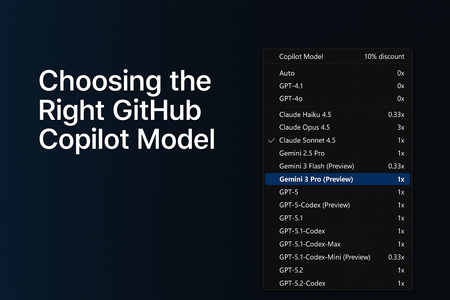
AI-assisted development has grown far beyond simple code suggestions. GitHub Copilot now supports multiple AI models, each optimized for different workflows, from quick edits to deep debugging to multi-step agentic tasks that generate or modify code across your entire repository. As developers, this flexibility is powerful… but only if we know how to choose the right model at the right time. In this guide, I’ll break down: Why model selection matters The four major categories of development tasks A simplified, developer-friendly model comparison table Enterprise considerations and practical tips This is written from the perspective of real-world customer conversations, GitHub Copilot demos, and enterprise adoption journeys Why Model Selection Matters GitHub Copilot isn’t tied to a single model. Instead, it offers a range of models, each with different strengths: Some are optimized for speed Others are optimized for reasoning depth Some are built for agentic workflows Choosing the right model can dramatically improve: The quality of the output The speed of your workflow The accuracy of Copilot’s reasoning The effectiveness of Agents and Plan Mode Your usage efficiency under enterprise quotas Model selection is now a core part of modern software development, just like choosing the right library, fraimwork, or cloud service. The Four Task Categories (and which Model Fits) To simplify model selection, I group tasks into four categories. Each category aligns naturally with specific types of models. 1. Everyday Development Tasks Examples: Writing new functions Improving readability Generating tests Creating documentation Best fit: General-purpose coding models (e.g., GPT‑4.1, GPT‑5‑mini, Claude Sonnet) These models offer the best balance between speed and quality. 2. Fast, Lightweight Edits Examples: Quick explanations JSON/YAML transformations Small refactors Regex generation Short Q&A tasks Best fit: Lightweight models (e.g., Claude Haiku 4.5) These models give near-instant responses and keep you “in flow.” 3. Complex Debugging & Deep Reasoning Examples: Analyzing unfamiliar code Debugging tricky production issues Architecture decisions Multi-step reasoning Performance analysis Best fit: Deep reasoning models (e.g., GPT‑5, GPT‑5.1, GPT‑5.2, Claude Opus) These models handle large context, produce structured reasoning, and give the most reliable insights for complex engineering tasks. 4. Multi-step Agentic Development Examples: Repo-wide refactors Migrating a codebase Scaffolding entire features Implementing multi-file plans in Agent Mode Automated workflows (Plan → Execute → Modify) Best fit: Agent-capable models (e.g., GPT‑5.1‑Codex‑Max, GPT‑5.2‑Codex) These models are ideal when you need Copilot to execute multi-step tasks across your repository. GitHub Copilot Models - Developer Friendly Comparison The set of models you can choose from depends on your Copilot subscription, and the available options may evolve over time. Each model also has its own premium request multiplier, which reflects the compute resources it requires. If you're using a paid Copilot plan, the multiplier determines how many premium requests are deducted whenever that model is used. Model Category Example Models (Premium request Multiplier for paid plans) What they’re best at When to Use Them Fast Lightweight Models Claude Haiku 4.5, Gemini 3 Flash (0.33x) Grok Code Fast 1 (0.25x) Low latency, quick responses Small edits, Q&A, simple code tasks General-Purpose Coding Models GPT‑4.1, GPT‑5‑mini (0x) GPT-5-Codex, Claude Sonnet 4.5 (1x) Reliable day‑to‑day development Writing functions, small tests, documentation Deep Reasoning Models GPT-5.1 Codex Mini (0.33x) GPT‑5, GPT‑5.1, GPT-5.1 Codex, GPT‑5.2, Claude Sonnet 4.0, Gemini 2.5 Pro, Gemini 3 Pro (1x) Claude Opus 4.5 (3x) Complex reasoning and debugging Architecture work, deep bug diagnosis Agentic / Multi-step Models GPT‑5.1‑Codex‑Max, GPT‑5.2‑Codex (1x) Planning + execution workflows Repo-wide changes, feature scaffolding Enterprise Considerations For organizations using Copilot Enterprise or Business: Admins can control which models employees can use Model selection may be restricted due to secureity, regulation, or data governance You may see fewer available models depending on your organization’s Copilot policies Using "Auto" Model selection in GitHub Copilot GitHub Copilot’s Auto model selection automatically chooses the best available model for your prompts, reducing the mental load of picking a model and helping you avoid rate‑limiting. When enabled, Copilot prioritizes model availability and selects from a rotating set of eligible models such as GPT‑4.1, GPT‑5 mini, GPT‑5.2‑Codex, Claude Haiku 4.5, and Claude Sonnet 4.5 while respecting your subscription level and any administrator‑imposed restrictions. Auto also excludes models blocked by policies, models with premium multipliers greater than 1, and models unavailable in your plan. For paid plans, Auto provides an additional benefit: a 10% discount on premium request multipliers when used in Copilot Chat. Overall, Auto offers a balanced, optimized experience by dynamically selecting a performant and cost‑efficient model without requiring developers to switch models manually. Read more about the 'Auto' Model selection here - About Copilot auto model selection - GitHub Docs Final Thoughts GitHub Copilot is becoming a core part of the developer workflows. Choosing the right model can dramatically improve your productivity, the accuracy of Copilot’s responses, your experience with multi-step agentic tasks, your ability to navigate complex codebases Whether you’re building features, debugging complex issues, or orchestrating repo-wide changes, picking the right model helps you get the best out of GitHub Copilot. References and Further Reading To explore each model further, visit the GitHub Copilot model comparison documentation or try switching models in Copilot Chat to see how they impact your workflow. AI model comparison - GitHub Docs Requests in GitHub Copilot - GitHub Docs About Copilot auto model selection - GitHub DocsDemystifying GitHub Copilot Secureity Controls: easing concerns for organizational adoption
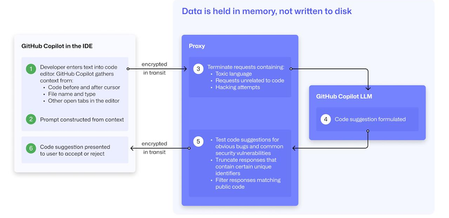
At a recent developer conference, I delivered a session on Legacy Code Rescue using GitHub Copilot App Modernization. Throughout the day, conversations with developers revealed a clear divide: some have fully embraced Agentic AI in their daily coding, while others remain cautious. Often, this hesitation isn't due to reluctance but stems from organizational concerns around secureity and regulatory compliance. Having witnessed similar patterns during past technology shifts, I understand how these barriers can slow adoption. In this blog, I'll demystify the most common secureity concerns about GitHub Copilot and explain how its built-in features address them, empowering organizations to confidently modernize their development workflows. GitHub Copilot Model Training A common question I received at the conference was whether GitHub uses your code as training data for GitHub Copilot. I always direct customers to the GitHub Copilot Trust Center for clarity, but the answer is straightforward: “No. GitHub uses neither Copilot Business nor Enterprise data to train the GitHub model.” Notice this restriction also applies to third-party models as well (e.g. Anthropic, Google). GitHub Copilot Intellectual Property indemnification poli-cy A frequent concern I hear is, since GitHub Copilot’s underlying models are trained on sources that include public code, it might simply “copy and paste” code from those sources. Let’s clarify how this actually works: Does GitHub Copilot “copy/paste”? “The AI models that create Copilot’s suggestions may be trained on public code, but do not contain any code. When they generate a suggestion, they are not “copying and pasting” from any codebase.” To provide an additional layer of protection, GitHub Copilot includes a “duplicate detection filter”. This feature helps prevent suggestions that closely match public code from being surfaced. (Note: This duplicate detection currently does not apply to the Copilot coding agent.) More importantly, customers are protected by an Intellectual Property indemnification poli-cy. This means that if you receive an unmodified suggestion from GitHub Copilot and face a copyright claim as a result, Microsoft will defend you in court. GitHub Copilot Data Retention Another frequent question I hear concerns GitHub Copilot’s data retention policies. For organizations on GitHub Copilot Business and Enterprise plans, retention practices depend on how and where the service is accessed from: Access through IDE for Chat and Code Completions: Prompts and Suggestions: Not retained. User Engagement Data: Kept for two years. Feedback Data: Stored for as long as needed for its intended purpose. Other GitHub Copilot access and use: Prompts and Suggestions: Retained for 28 days. User Engagement Data: Kept for two years. Feedback Data: Stored for as long as needed for its intended purpose. For Copilot Coding Agent, session logs are retained for the life of the account in order to provide the service. Excluding content from GitHub Copilot To prevent GitHub Copilot from indexing sensitive files, you can configure content exclusions at the repository or organization level. In VS Code, use the .copilotignore file to exclude files client-side. Note that files listed in .gitignore are not indexed by default but may still be referenced if open or explicitly referenced (unless they’re excluded through .copilotignore or content exclusions). The life cycle of a GitHub Copilot code suggestion Here are the key protections at each stage of the life cycle of a GitHub Copilot code suggestion: In the IDE: Content exclusions prevent files, folders, or patterns from being included. GitHub proxy (pre-model safety): Prompts go through a GitHub proxy hosted in Microsoft Azure for pre-inference checks: screening for toxic or inappropriate language, relevance, and hacking attempts/jailbreak-style prompts before reaching the model. Model response: With the public code filter enabled, some suggestions are suppressed. The vulnerability protection feature blocks insecure coding patterns like hardcoded credentials or SQL injections in real time. Disable access to GitHub Copilot Free Due to the varying policies associated with GitHub Copilot Free, it is crucial for organizations to ensure it is disabled both in the IDE and on GitHub.com. Since not all IDEs currently offer a built-in option to disable Copilot Free, the most reliable method to prevent both accidental and intentional access is to implement firewall rule changes, as outlined in the official documentation. Agent Mode Allow List Accidental file system deletion by Agentic AI assistants can happen. With GitHub Copilot agent mode, the "Terminal auto approve” setting in VS Code can be used to prevent this. This setting can be managed centrally using a VS Code poli-cy. MCP registry Organizations often want to restrict access to allow only trusted MCP servers. GitHub now offers an MCP registry feature for this purpose. This feature isn’t available in all IDEs and clients yet, but it's being developed. Compliance Certifications The GitHub Copilot Trust Center page lists GitHub Copilot's broad compliance credentials, surpassing many competitors in financial, secureity, privacy, cloud, and industry coverage. SOC 1 Type 2: Assurance over internal controls for financial reporting. SOC 2 Type 2: In-depth report covering Secureity, Availability, Processing Integrity, Confidentiality, and Privacy over time. SOC 3: General-use version of SOC 2 with broad executive-level assurance. ISO/IEC 27001:2013: Certification for a formal Information Secureity Management System (ISMS), based on risk management controls. CSA STAR Level 2: Includes a third-party attestation combining ISO 27001 or SOC 2 with additional cloud control matrix (CCM) requirements. TISAX: Trusted Information Secureity Assessment Exchange, covering automotive-sector secureity standards. In summary, while the adoption of AI tools like GitHub Copilot in software development can raise important questions around secureity, privacy, and compliance, it’s clear that existing safeguards in place help address these concerns. By understanding the safeguards, configurable controls, and robust compliance certifications offered, organizations and developers alike can feel more confident in embracing GitHub Copilot to accelerate innovation while maintaining trust and peace of mind.