excel
44674 Topics
Top n vs. Others in Excel
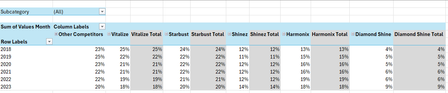
Hi all, I'm seeking some help because I'm kind of new to the more intermediate stuff in Excel. I have an Excel table with the following columns: Subcategory in column A, Brand in column B, Region in column C, Year in column D and Values Month in column E. I want to create a PivotTable and a Pivot line chart from this PivotTable that ranks the Top 5 Brands vs. Other Competitors by each region. For added context: There are 5 subcategories, 3 regions and 25 brands. Currently, I've tried grouping the remaining 20 brands as "Other Competitors" vs. the Top 5 brands within a selected region and possibly all regions (when no selection is made). I'm seeking a solution similar to this... Please mind the colours. I will sort those out later. But, the problem that I'm faced with is that upon selection of a region, the PivotTable won't update to the Top 5 brands of a selected region because they've already been grouped. How can I make this more dynamic so that I'm able to show The Top 5 brands vs. Others? Please help. EDIT: My operating system is Windows 10 (64-bit) and I use Excel 365 (Desktop version). For reference, I've attached a link to a sample file. https://1drv.ms/x/c/b2d878e32a062614/IQC1wcnwLICcQasOfnGcwKn0ASjpXp9xQ6rjnOP10Jal5cc?e=HaXEWd Thank you all once again.Solved780Views2likes30Comments
Excel - single window, more files
How difficult it is to convince Microsoft team to fix major problems? I've recently switched to new Excel and I'm ...amazed. We used to be able to open multiple files, sheets in the same window. Opening multiple windows was possible as well. Now everything, even the same sheet is in new window. Every new window has it's own tool ribbon. Which is taking space. Ribbons do not synchronize - also slowing down the work. I get that there is and idea behind it. Probably more stable, easier to code or something entirely different that I do not know. But this is so annoying to work with. Is it possible to convince Microsoft that they should find a solution to problem they created?26Views0likes0CommentsExcel giving incorrect answer to simple multiplication
This is undoubtedly due to some quirk of Excel, but I was using Excel to illustrate how fast doubling increases things. I was using the old story about the person who would work for $ .01 for the first day, .02 for the second, .04 for the third, etc. My formula is essentially A2=A1*2 carried through 64 cells. The cells are all formatted as currency with two decimal points. The calculations are all correct until day 51. Day 49 = 5,629,499,534,213.12. Day 50 should end with $xxxxxxxx.24. Instead it ends with .20. Day 51 (should end with .48) ends with .50 and so on through the rest of the spreadsheet. This probably has something to do with floating-point calculations, but there should be a way for it to just work with the actual number.76Views0likes3Comments
Unwanted Formular in Excel i need to get rid of Please.
Hello, i had had someone apply the below formular on a spreadsheet i maintain which i am not clear about. apparently this formular is used to append row numbers to the rows in my large excel sheet rather than the manual row number entry. I now don't want this formular and would like to revert back to manual row number entry but don't know what to do. if i delete the formular it also deletes the existing row number and i may loose the ability to match the row numbers to the actual content of the spreadsheet. Is there a way i can convert my rows back to manual please? This formula (="D_4" & TEXT(ROW() - ROW(Table5[[#Headers],[Defect Ref]]) - 400, "0;-0")) generates a custom defect reference code for each row in the “Defect Ref” column of Table5 in the “Defect_Log” sheet. It starts with the text "D_4". ROW() returns the row number of the current cell. ROW(Table5[[#Headers],[Defect Ref]]) returns the row number of the header row for the “Defect Ref” column in Table5 (which is row 3). Subtracts 400 from the difference between the current row and the header row, so for row 4: 4 - 3 - 400 = -399. TEXT(..., "0;-0") formats the result as a number, showing negative values with a minus sign. The formula concatenates "D_4" with the56Views0likes2Comments
Validating & Populating Cells with dates based on a Date Picker
Hello, we are working on a really simple delivery schedule for Monday thru Friday. The top row has a cell that is formatted as a short date picker. In choosing a date in that cell, I would like the dates of the 5 numbered cells below for each day of that week to be updated based on the date chosen. For instance, I chose 2/1/26 in the date picker. I would like cells A2, H2, O2, V2, and AC2 to correlate to that date number and automatically populate the proper day of the month. If possible, it would be great if the month names that are in cells D3, K3, R3, Y3, and AF3 would also correlate and update properly. Any help would be most appreciated, I attached a screenshot to show the layout. Thank you very much in advance.57Views0likes1CommentReplacing a string of words with a single number
I work with a lot of outcome data from a survey that has words as the typical response to questions. I need to convert those words to a number value so that I can analyze the data (example: "I really agree" -> "4"). I would need to be able to do this across multiple cells with multiple different values that I don't want to change. I have tried the substitute and replace functions and have run into problems with both that don't allow me to change the one specific text value to a specific number across multiple cells with different values. I am hoping there is a way to do this in excel using functions that I just haven't found yet as this is a process that I currently do manually across hundreds of cells. Would appreciate any help or advice to streamline this process, thanks!91Views0likes3Comments
No stocks button/option
I have an active Microsoft 365 subscription through my Apple ID. But the Stocks button is completely missing from the Data tab. This issue occurs in both the Excel for Mac app (version 16.105.3) and Excel Online. My privacy settings for "Connected Experiences" are all enabled. I've already run the Office License Removal Tool and logged in again, but to no avail. Since the feature is also missing in the web version, it appears to be an issue with my Microsoft account configuration itself. Microsoft support can't see my settings and refers me to this forum. Does anyone have any ideas?40Views0likes2CommentsChart updates inconsistently when dynamic array resizes
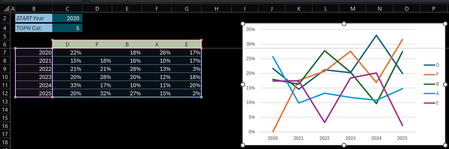
Hi (Excel 365 v2601 b19628.20132 Current Channel / Windows 11 25H2) Initial post edited (& cross posted here on Jan 29, 2026) after further investigations In B6 below an array that dynamically resizes according to the 'START Year' & 'TOPN Cat' variables. The Chart is setup as follow: Select an empty cell > Insert 2-D Line chart Right-click > Select Data… > Chart data range > Select the Serie names & Values (C6:G12) Click Edit under Horizontal (Category) Axis Labels > Select the range with the Years (B7:B12) Check of the Chart data range: Changing 'START Year' works no problem: the Chart data range & Horizonal Axis Label range are properly updated Changing 'TOPN Cat' (the array resizes horizontally) screws up the chart: The Chart data range is properly updated but the Series & Axis Label ranges don't update accordingly Q: Am I doing something wrong, facing a limitation or is this something else? Tried to attach the sample file 3 times... it's available at: Dynamic_Chart_Challenge.xlsx Thanks & any question let me know Lz.455Views1like8Comments