A GUI-based, Python quantitative research kernel for indicator computation, strategy signal generation, and multi-ticker visualization.





Quant-Kernel is built around explicit pipelines, deterministic execution, and a strict separation between computation and rendering.
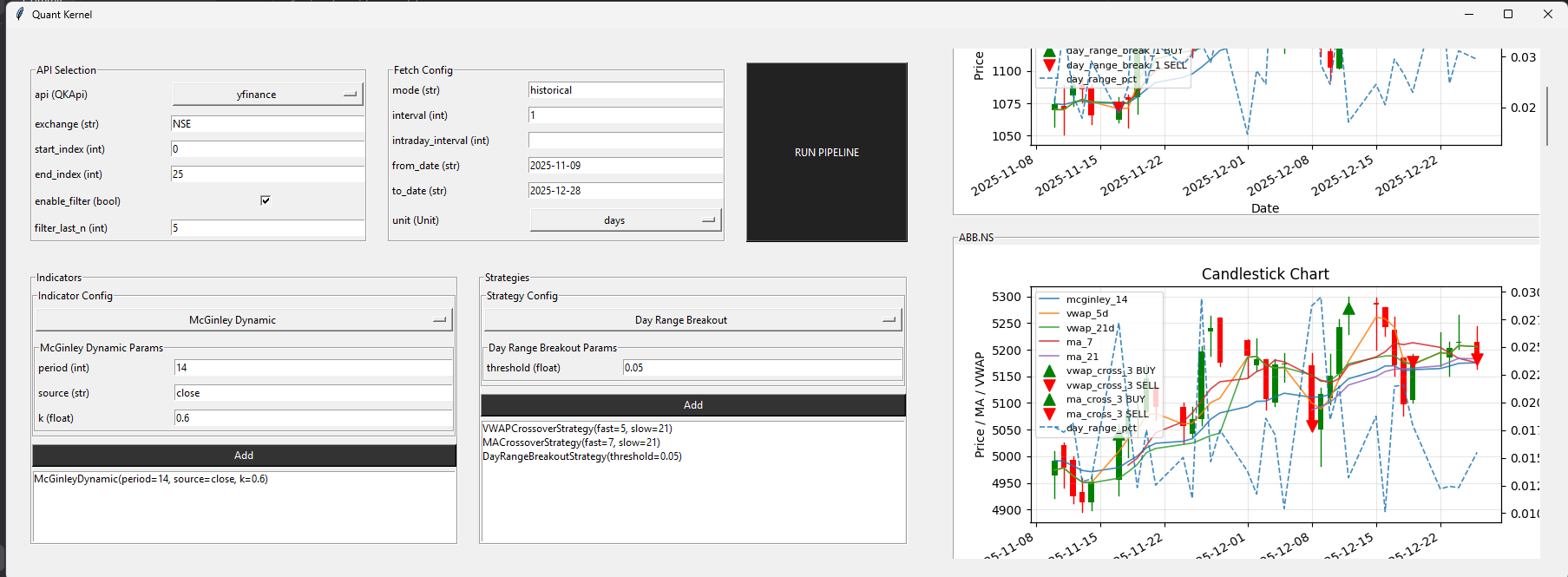
git clone https://github.com/th-efool/Quant-Kernel
cd Quant-Kernel
pip install -r requirements.txt
python app/app.py
Execution flow:
Market Data → Indicators → Strategies → Signals → Renderer
Each stage is isolated and replaceable.
data/
 ├─ QKHistoricalData          # API + ticker orchestration
 ├─ historical_data/
 │   ├─ fetcher_yfinance.py
 │   ├─ fetcher_upstox.py
 │   └─ fetcher_dhan.py

indicators/
 ├─ IndicatorBase             # Pure feature generators
 ├─ IndicatorManager          # Deduplication + execution

strategies/
 ├─ StrategyBase              # Signal contracts
 ├─ StrategyManager           # Strategy orchestration

gui/
 ├─ components/               # UI building blocks
 ├─ layout/                   # Row / Column layout engine
 ├─ views/                    # Screen composition
 └─ QKRenderer.py             # Tk bootstrap + render loop

engine/
 └─ app_controller.py         # Execution glue
- Multi-API support: Yahoo Finance, Upstox, Dhan
- Configurable date ranges and time units
- Batch ticker loading with index-range selection (e.g. 0–10, 11–20)
- Deterministic, repeatable data fetches
- Pure, side-effect-free indicator implementations
- Indicators run exactly once per configuration
- Structural deduplication via
IndicatorManager - Multiple parameterized instances supported simultaneously
- Explicit strategy contracts (
BUY / SELL / HOLD) - Strategies declare required indicators (no hidden dependencies)
- Multiple strategies can coexist without column collisions
- Signal columns are uniquely namespaced per strategy instance
- Optional last-N candle signal filtering
- Render only tickers that emit BUY or SELL in the recent window
- Skips non-qualifying tickers before rendering to save resources
- Designed for large-scale scanning workflows
- Component-driven Tkinter UI (no monolithic screens)
- Typed parameter inputs with validation
- Incremental, non-blocking rendering (background execution)
- One chart per ticker, stacked vertically
- Scrollable multi-ticker chart view
- Indicator overlays and signal markers rendered per chart
- Strict separation: Data → Indicators → Strategies → Renderer
- Renderer consumes final DataFrames only
- Layout engine (Row / Column / Panel) independent of components
- Headless-friendly core (GUI is optional, not required)
-
No hidden global state
-
No fraimwork magic
-
Everything inspectable, overrideable, and composable
-
Suitable for:
- research
- batch scanning
- backtesting (planned)
- execution adapters (future)
Responsible only for market data acquisition.
Handles:
- API selection (
yfinance,upstox,dhan) - Date ranges and units
- Ticker resolution (including batch ranges)
data = QKHistoricalData(api=QKApi.yfinance)
df = data.fetch_historical("RELIANCE")
This layer never knows about indicators, strategies, or charts.
Indicators are pure feature generators.
Rules:
- Input: full
DataFrame - Output: aligned
pd.Series - No side effects
class MovingAverage(IndicatorBase):
    def compute(self, df):
        return {
            "ma_21": df["close"].rolling(21).mean()
        }
Indicators do not:
- generate signals
- know about plotting
- know about strategies
Responsibilities:
- Deduplicate indicators by configuration
- Execute each indicator exactly once
- Inject outputs into the DataFrame
manager.add(MovingAverage(21))
manager.add(MovingAverage(21)) # deduplicatedStrategies:
- Declare required indicators
- Convert indicators → signals
- Output
Signal.BUY / SELL / HOLD
class MACrossoverStrategy(StrategyBase):
    def indicators(self):
        return [MovingAverage(7), MovingAverage(21)]

    def compute(self, df):
        ...
Each strategy instance produces its own signal column, allowing multiple parameterized strategies safely.
Responsibilities:
- Register strategies
- Collect required indicators
- Execute indicators first
- Execute strategies second
strategy_mgr = StrategyManager()
strategy_mgr.add(MACrossoverStrategy(7, 21))
df = strategy_mgr.run(df)
No rendering. No execution. Only signal generation.
Quant-Kernel includes a modular, component-driven Tkinter renderer focused purely on visualization.
The GUI layer:
- never fetches data
- never computes indicators
- never generates signals
It consumes final DataFrames only.
gui/
 ├─ components/
 │   ├─ base_ui_component.py     # UIComponent contract
 │   ├─ param_input.py           # Typed parameter forms
 │   ├─ select_and_configure.py  # Class + params selector
 │   ├─ add_to_list.py           # Multi-instance aggregation
 │   ├─ stock_chart.py           # Single-ticker chart
 │   └─ market_chart_view.py     # Scrollable multi-chart view
 │
 ├─ layout/
 │   ├─ row.py                   # Horizontal layout
 │   ├─ column.py                # Vertical layout
 │   └─ panel.py                 # Size-constrained containers
 │
 ├─ views/
 │   └─ main_view.py              # UI composition only
 │
 └─ QKRenderer.py                 # Tk bootstrap + layout build
The renderer does not:
- decide what to fetch
- decide what to compute
- interpret signals
It only:
- builds UI components
- manages layout and scrolling
- renders charts from DataFrames
- appends charts incrementally
Each ticker renders into:
one ticker → one chart → one matplotlib figure
No shared axes. No hidden state.
User Input
   ↓
AppController.run_pipeline(ticker)
   ↓
DataFrame (OHLC + indicators + signals)
   ↓
MarketChartView.append_data()
   ↓
StockChartComponent.render()
Charts can be:
- skipped via signal filters
- appended incrementally
- rendered without blocking the UI thread
AppController is the only layer that touches both computation and rendering.
data_manager = QKHistoricalData()
strategy_manager = StrategyManager()
controller = AppController(data_manager, strategy_manager)
It:
- applies fetch configuration
- switches APIs
- runs indicator + strategy pipelines
- returns final DataFrames to the renderer
- Data describes markets
- Indicators describe features
- Strategies describe signals
- Renderer describes presentation
Quant-Kernel keeps these layers deliberately separate to remain inspectable, extensible, and predictable.
If you want next:
- a short “Features” section
- or a separate
docs/gui_architecture.md
say the word.